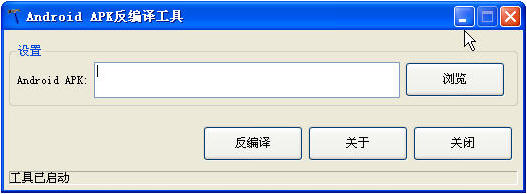
现在的手机基本都被安卓和IOS占据了,IOS是封闭系统,不可能破解,但是对于开源的安卓,我们可以进行学习反编译,今天小编就分享一个Android可视化反编译工具
假设我们有一个应用,它的类文件编译后被单独拿了出来,即有两个文件app.apk和app.odex,把他们放在$AndroidDecompile下。
1. 使用 baksmali.jar 将 odex 文件分解为 smali 文件
$ java –jar baksmali-1.2.5.jar –x app.odex
如果成功的话,会在 $AndroidDecompile下生成一个 out目录,里面是一些以“.smali”为后缀名的文件,在此不深究这些文件的作用。
2. 使用 smali.jar将 out/目录下的smali文件转换为 classes.dex
$ java -Xmx512M –jar smali-1.2.5.jar out –o classes.dex
classes.dex便是Dalvik VM所使用的编译后的类文件格式,在正常的apk文件里都会有。
3. 使用 dex2jar将classes.dex反编译为jar文件
将下载后的dex2jar压缩包解压后,里面会有dex2jar.sh(和dex2jar.bat)文件,假如classes.dex文件与dex2jar.sh在同一目录下,使用以下方式将classes.dex反编译为jar文件:
$dex2jar.sh classes.dex
如果执行成功,则会在当前目录下生成反编译后的文件classes.dex.dex2jar.jar。
dex2jar即可以操作dex文件,也可以直接操作apk文件,它的使用规则为:
dex2jar file1.dexORapk file2.dexORapk ...
4. 使用JD-GUI查看反编译后的jar文件
JD-GUI是一个可视化的Java反编译代码查看器,它可以实时的将class文件反编译成java文件进行查看。解压下载的jd-gui文件,执行目录中的jd-gui可执行文件启动,然后加载上一步中反编译好的classes.dex.dex2jar.jar文件即可。
5. 将从odex反编译后的classes.dex与其他资源文件重新打包成一个完整的apk
以上我们假设的情况是应用程序编译后的类文件从apk文件中被剥离出来,下面要做的是如何将上述步骤中得到的classes.dex与apk中的其他文件重新打包成一个可用的apk。
首先将反编译后的classes.dex和原先的app.apk(不含classes.dex)重新压缩成一个完整的app.apk(apk文件可用压缩工具打开),也就是说将classes.dex放进app.apk中。
将下载的AutoSign文件解压,可以看到有signapk.jar(还有个Sign.bat)文件,执行以下命令给app.apk文件签名,就可以生成一个可以运行的apk文件了。
$ java -jar signapk.jar testkey.x509.pem testkey.pk8 app.apk app_signed.apk
6. apktool的使用
网上还有个工具是apktool,可以对apk进行解析,反编译资源文件,并将类文件解析成smali文件;同时还可以将解析后的文件重新打包成apk。功能和以上介绍的几个工具类似,它的使用方法如下:
apktool d app.apk and 反编译 app.apk到文件夹and
apktool b app 从文件夹app重建APK,输出到ABC\dist\out.apk
具体的使用方法在此不再赘述,请参考官方网站,或者:
http://www.geeka.net/2010/05/apktool-decode-android-google-code/
7. 我的 $AndroidDecompile目录下的文件的截图

1. baksmali 的帮助信息
usage: java -jar baksmali.jar [options] <dex-file>
disassembles and/or dumps a dex file
-?,--help Prints the help message then exits.
-b,--no-debug-info Specify twice for debug options
don't write out debug info (.local,
.param, .line, etc.)
-c,--bootclasspath <BOOTCLASSPATH> The bootclasspath jars to use, for
analysis. Defaults to
core.jar:ext.jar:framework.jar:andro
id.policy.jar:services.jar. If the
value begins with a :, it will be
appended to the default
bootclasspath instead of replacing it
-d,--bootclasspath-dir <DIR> The base folder to look for the
bootclasspath files in. Defaults to
the current directory
-f,--code-offsets Add comments to the disassembly
containing the code offset for each address
-l,--use-locals Output the .locals directive with
the number of non-parameter
registers, rather than the .register
-o,--output <DIR> Directive with the total number of register
the directory where the disassembled
files will be placed. The default is out
-p,--no-parameter-registers Use the v<n> syntax instead of the
p<n> syntax for registers mapped to
method parameters
-r,--register-info <REGISTER_INFO_TYPES> Print the specificed type(s) of
register information for each
instruction. "ARGS,DEST" is the
default if no types are specified.
Valid values are:
ALL: all pre- and post-instruction registers.
ALLPRE: all pre-instruction registers
ALLPOST: all post-instruction registers
ARGS: any pre-instruction registers
used as arguments to the instruction
DEST: the post-instruction
destination register, if any
MERGE: Any pre-instruction register
has been merged from more than 1
different post-instruction register
from its predecessors
FULLMERGE: For each register that
would be printed by MERGE, also show
the incoming register types that
were merged
-s,--sequential-labels Create label names using a
sequential numbering scheme per
label type, rather than using the
bytecode address
-v,--version Prints the version then exits
-x,--deodex Deodex the given odex file. This
option is ignored if the input file
is not an odex file
2. smali 的帮助信息
usage: java -jar smali.jar [options] [--] [<smali-file>|folder]*
assembles a set of smali files into a dex file
-?,--help prints the help message then exits. Specify twice for
debug options
-o,--output <FILE> the name of the dex file that will be written. The default
is out.dex
-v,--version prints the version then exits
3. auto-sign 的帮助信息
SignApk.jar is a tool included with the Android platform source bundle.
testkey.pk8 is the private key that is compatible with the recovery image included in this zip file
testkey.x509.pem is the corresponding certificate/public key
Usage:
java -jar signapk.jar testkey.x509.pem testkey.pk8 update.zip update_signed.zip
4. apktool 的帮助信息
Apktool v1.3.2 - a tool for reengineering Android apk files
Copyright 2010 Ryszard Wi?niewski <brut.alll@gmail.com>
Apache License 2.0 (http://www.apache.org/licenses/LICENSE-2.0)
Usage: apktool [-v|--verbose] COMMAND [...]
COMMANDs are:
d[ecode] [OPTS] <file.apk> [<dir>]
Decode <file.apk> to <dir>.
OPTS:
-s, --no-src
Do not decode sources.
-r, --no-res
Do not decode resources.
-d, --debug
Decode in debug mode. Check project page for more info.
-f, --force
Force delete destination directory.
-t <tag>, --frame-tag <tag>
Try to use framework files tagged by <tag>.
--keep-broken-res
Use if there was an error and some resources were dropped, e.g.:
"Invalid config flags detected. Dropping resources", but you
want to decode them anyway, even with errors. You will have to
fix them manually before building.
b[uild] [OPTS] [<app_path>] [<out_file>]
Build an apk from already decoded application located in <app_path>.
It will automatically detect, whether files was changed and perform
needed steps only.
If you omit <app_path> then current directory will be used.
If you omit <out_file> then <app_path>/dist/<name_of_original.apk>
will be used.
OPTS:
-f, --force-all
Skip changes detection and build all files.
-d, --debug
Build in debug mode. Check project page for more info.
if|install-framework <framework.apk> [<tag>]
Install framework file to your system.


248.9M / 12-08
RTS即时战略
下载
248.9M / 12-08
RTS即时战略
下载
253.4M / 12-08
RPG角色扮演
下载 妻中蜜3全cg存档
10博网体育备用网址工具 / 28KB
下载
1
妻中蜜3全cg存档
10博网体育备用网址工具 / 28KB
下载
1
 csgo空格键连跳脚本绿色免费版
10博网体育备用网址工具 / 564KB
下载
2
csgo空格键连跳脚本绿色免费版
10博网体育备用网址工具 / 564KB
下载
2
 platform tools工具包官方版v36.0.2
编程软件 / 7.3M
下载
3
platform tools工具包官方版v36.0.2
编程软件 / 7.3M
下载
3
 vba for wps安装包v7.1官方版
编程软件 / 35.0M
下载
4
vba for wps安装包v7.1官方版
编程软件 / 35.0M
下载
4
 DNF9周年第十套天空时装补丁
10博网体育备用网址工具 / 1.6M
下载
5
DNF9周年第十套天空时装补丁
10博网体育备用网址工具 / 1.6M
下载
5
 易控王文档加密软件v2017官方版绿色免费版
文件处理 / 46M
下载
6
易控王文档加密软件v2017官方版绿色免费版
文件处理 / 46M
下载
6
 3456wg多选皮肤v10.6官方版
10博网体育备用网址工具 / 2.2M
下载
7
3456wg多选皮肤v10.6官方版
10博网体育备用网址工具 / 2.2M
下载
7
 GTKWave(WAV文件波形察看工具)v3.3.66 官方版
文件处理 / 4.4M
下载
8
GTKWave(WAV文件波形察看工具)v3.3.66 官方版
文件处理 / 4.4M
下载
8
 支付宝AR红包小工具1.0 绿色版
文件处理 / 255KB
下载
9
支付宝AR红包小工具1.0 绿色版
文件处理 / 255KB
下载
9
 苹果ios10强制降级工具绕过验证1.0 官方版
文件处理 / 60M
下载
10
苹果ios10强制降级工具绕过验证1.0 官方版
文件处理 / 60M
下载
10
114.9M / 06-09
 立即下载
立即下载
159M / 06-09
 立即下载
立即下载
208.1M / 06-09
 立即下载
立即下载
124.2M / 06-09
 立即下载
立即下载
57.2M / 06-09
 立即下载
立即下载
153M / 06-05
 立即下载
立即下载
444M / 06-05
 立即下载
立即下载
497M / 06-05
 立即下载
立即下载
2.34G / 06-05
 立即下载
立即下载
815.1M / 06-05
 立即下载
立即下载
126.3M / 06-09
 立即下载
立即下载
25.9M / 06-09
 立即下载
立即下载
985.7M / 06-08
 立即下载
立即下载
301.0M / 06-08
 立即下载
立即下载
34.60G / 06-08
 立即下载
立即下载
2.63G / 06-08
 立即下载
立即下载
926.0M / 06-08
 立即下载
立即下载
847.0M / 06-08
 立即下载
立即下载
296.2M / 06-05
 立即下载
立即下载
35.0M / 06-05
 立即下载
立即下载
11M / 06-09
 立即下载
立即下载 21M / 06-09
 立即下载
立即下载 21.5M / 06-09
 立即下载
立即下载 14.6M / 06-09
 立即下载
立即下载 11.2M / 06-05
 立即下载
立即下载 45.5M / 06-05
 立即下载
立即下载 14.1M / 06-05
 立即下载
立即下载 26.2M / 06-05
 立即下载
立即下载 133M / 06-05
 立即下载
立即下载 390.3M / 06-05
 立即下载
立即下载 63.1M / 06-09
 立即下载
立即下载 986.4M / 06-09
 立即下载
立即下载 356.2M / 06-09
 立即下载
立即下载 181.9M / 06-05
 立即下载
立即下载 46M / 06-05
 立即下载
立即下载 88.6M / 06-05
 立即下载
立即下载 29.7M / 06-05
 立即下载
立即下载 870.4M / 06-05
 立即下载
立即下载 44M / 06-05
 立即下载
立即下载 13.7M / 06-05
 立即下载
立即下载 1.27G / 06-09
 立即下载
立即下载 1.05G / 06-05
 立即下载
立即下载 2.49G / 06-01
 立即下载
立即下载 9.84G / 06-01
 立即下载
立即下载 956.1M / 05-28
 立即下载
立即下载 181.5M / 05-28
 立即下载
立即下载 255.9M / 05-28
 立即下载
立即下载 245.1M / 05-28
 立即下载
立即下载 1.07G / 05-28
 立即下载
立即下载 113.2M / 05-28
 立即下载
立即下载 41.5M / 06-09
 立即下载
立即下载 483.3M / 06-09
 立即下载
立即下载 25.7M / 06-05
 立即下载
立即下载 120.5M / 06-05
 立即下载
立即下载 1.10G / 06-05
 立即下载
立即下载 6.09G / 06-04
 立即下载
立即下载 8M / 06-04
 立即下载
立即下载 3.30G / 06-04
 立即下载
立即下载 820.0M / 06-04
 立即下载
立即下载 30.2M / 06-04
 立即下载
立即下载 466.6M / 06-09
 立即下载
立即下载 231.5M / 06-05
 立即下载
立即下载 79.6M / 06-05
 立即下载
立即下载 17.7M / 06-05
 立即下载
立即下载 499.9M / 06-05
 立即下载
立即下载 160M / 06-04
 立即下载
立即下载 60M / 06-04
 立即下载
立即下载 254.8M / 06-04
 立即下载
立即下载 268M / 06-04
 立即下载
立即下载 232.0M / 06-04
 立即下载
立即下载 517M / 06-09
 立即下载
立即下载 35.6M / 06-05
 立即下载
立即下载 4.07G / 06-05
 立即下载
立即下载 222.0M / 06-05
 立即下载
立即下载 13.4M / 01-03
 立即下载
立即下载 293.0M / 09-05
 立即下载
立即下载 1.22G / 07-06
 立即下载
立即下载 20.53G / 07-06
 立即下载
立即下载 229.9M / 07-06
 立即下载
立即下载 3.70G / 07-06
 立即下载
立即下载